

Traveling this year and need service outside the U.S.? This guide breaks down how roaming works, what it costs, where it’s available, and how to set it up without headaches. If you’re on mint mobile, you’ll learn the exact steps to stay connected, what to expect for speeds, and when a local eSIM makes more sense. Everything below is current as of August 2025 with sources cited.
- How international roaming works on Mint
- Coverage and where it works
- Mexico and Canada specifics
- What you get for your money
- Setup before you fly
- Tips to control costs
- Alternatives if you travel a lot
- Planning with your base plan
- What to expect for speeds and reliability
- Troubleshooting on the road
- Conclusion
- FAQs
How international roaming works on Mint
Roaming lets your phone use partner networks abroad. For Mint, the feature runs on time-based passes sold inside your account and app. People often search mint mobile international or mint mobile international roaming and expect a separate plan. It’s not a separate plan. It’s a pass that unlocks talk, text, and data in 180+ destinations for a set number of days.
Mint sells four options called a minternational pass.
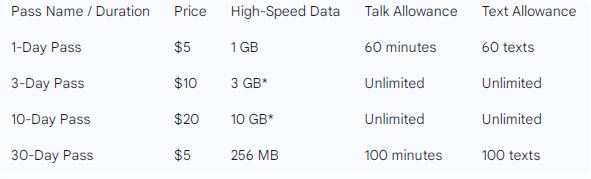
There’s a 1-day pass with 1GB and 60 minutes/60 texts for $5, a 3-day pass with unlimited data Including a 3GB high-speed plan for $10, a 10-day pass with unlimited data and a generous 10GB of high-speed data for $20, and a 30-day no-data pass with 100 minutes and 100 texts for just $5. Once you’ve used up your high-speed data, your connection speed will be reduced for the remainder of the pass’s duration.
Coverage and where it works
The passes work in over 180 countries and territories. Cruises and in-flight cellular are excluded, so don’t plan on using a pass there. Always confirm your destination in Mint’s eligibility tool before you buy; availability and rates can change. Be sure to examine your domestic service using the Mint Mobile coverage map before you depart the U.S. This will allow you to establish what your typical service is like while you are at home.
Mexico and Canada specifics
If you’re headed south and wondering about mint mobile mexico, your phone should work on local partner networks with a pass, and Mint’s official Mexico guide explains when a local eSIM is smarter versus roaming. Traveling north, Mint Mobile now provides free roaming in Canada, which includes unlimited talk and text, along with a monthly allocation of 3GB of high-speed data. This is included with your plan at no additional cost, though it is subject to certain fair-use limits.
Many travelers ask about mint international roaming for country-to-country trips. Passes work the same across supported destinations, so you can continue using the same active pass as you move between eligible countries. Always verify your phone bands and roaming partners for the places you’ll visit.
What you get for your money
Across passes, you receive a bucket of minutes and texts plus high-speed data. After you use the high-speed portion, speeds reduce but data remains usable for the pass duration. Your pass data is separate from your domestic plan allowance. Expect 4G LTE or 5G depending on local partners and your device. If you need long-term travel with constant data, compare total pass costs versus an international-first carrier or a local eSIM.
Setup before you fly
Confirm your phone is unlocked and compatible. To use your service when you arrive, simply turn on Data Roaming in your phone’s settings. Once you’ve bought your pass, you can activate it whenever you land by either using the app, logging into your web account, or by texting ACTIVATE to the number 6700. To check usage or status, text GOROAM to 6700 during your trip. If something breaks, toggle airplane mode, restart the phone, re-check APN, and try temporarily disabling Wi-Fi Calling to force a cellular attach.
You can manage everything from the mintmobile app once you log in. If you prefer to buy by text, send GO to 6700 and reply with the pass code the system offers for 1-, 3-, or 10-day options. Timing starts at activation, not purchase. Passes generally expire within about a year if unactivated, so buy close to your travel date.
Also Read: Best Free Sites for Registering Telemarketing Calls
Tips to control costs
Use free Wi-Fi Calling for calls back to the U.S. whenever you’re on a solid Wi-Fi network; those calls and texts don’t touch your pass buckets. Download offline maps and media before departure. If you mostly need to stay reachable for calls and texts during a month-long trip, the 30-day no-data option is the cheapest way to keep your U.S. number active abroad. For heavier data needs, compare a local eSIM for primary data and keep your pass for voice/SMS.
Alternatives if you travel a lot
If you’re a frequent flyer, compare total cost against international-friendly carriers. Google Fi and certain T-Mobile plans bundle roaming data across 200+ countries but at higher monthly prices. If you travel once or twice a year, passes usually win. If you’re abroad for months, a local plan typically saves more.
Planning with your base plan
Roaming passes are add-ons. Before you go, choose one of the mint mobile plans that fits your U.S. usage and budget, then layer passes only for the days you’ll actually need service abroad. People sometimes ask for mint mobile international plans; there isn’t a separate international plan—passes sit on top of your normal service. With mint, Wi-Fi Calling at home and abroad helps stretch both your domestic and roaming usage.
What to expect for speeds and reliability

Speeds depend on local partner networks, radio bands your phone supports, and congestion. Many destinations provide fast 4G and growing 5G access; others are slower. After you consume the high-speed data allotment on a pass, data is throttled until the pass window ends or you start a new pass. That’s normal behavior, not a bug.
Troubleshooting on the road
If data won’t connect, confirm the pass is active in your account, toggle airplane mode, switch Wi-Fi off and back on, and make sure Data Roaming is enabled. Verify APN settings if needed. If you’re still stuck, contact support from a different line or over Wi-Fi and mention your location and device model. For a quick status check, you can also text GOROAM to 6700.
Conclusion
Roaming with Mint in 2025 is straightforward: pick a pass, activate when you land, lean on Wi-Fi Calling to save minutes, and monitor your usage by text or in the app. For quick trips, passes are efficient. For long stays, run the math on local eSIMs. Either way, thoroughly planning a week before takeoff prevents surprises and keeps your number readily reachable wherever you’re headed.
FAQs
Does mint mobile work internationally?
Yes. With passes, service works in 180+ destinations for talk, text, and data. Check eligibility for each country in your account before you buy.
How much does a pass cost?
Options are $5 for 1 day, $10 for 3 days, $20 for 10 days, and $5 for the 30-day no-data pass. High-speed data caps vary by tier.
What’s included with mint mobile roaming?
Minutes and texts are counted; high-speed data is capped per pass. After the cap, speeds reduce for the remainder of the pass window.
Can I keep my U.S. number while using a local eSIM?
Yes. Dual-SIM phones let you keep your U.S. line active for calls/SMS and use a local data eSIM to save money. Verify your device supports dual SIM.
Where do I see countries and partners?
Use the eligibility checker inside your account and read Mint’s help articles on travel, checklist, and troubleshooting for step-by-step guidance.
