

A wallet prompt can ask you to share a public address, sign a message, or give an app permission to spend tokens. If a page uses the RobTheCoins name, read the request before approving anything. The public RobTheCoins pages reviewed describe a finance publication. Its articles discuss crypto services, but the site terms and articles checked leave the operator of any wallet service unverified.
Start with the action you intended. Reading a RobTheCoins article requires no wallet connection on the public pages reviewed. If a link from RobTheCoins opens a wallet prompt, pause there and establish which app sent it.
What the RobTheCoins Pages Establish
The RobTheCoins About page describes coverage of cryptocurrency, investing, and business. Searches for “business robthecoins” or “investing robthecoins” can lead readers to editorial archives. An article about RobTheCoins may discuss an exchange or a blockchain service. The operator’s own documentation is where you should look for the exact app, legal entity, and terms.
One RobTheCoins blockchain guide describes exchange and escrow features. A separate RobTheCoins trading article discusses spot and margin trading. The public RobTheCoins terms address general website use. These pages leave open who would operate a wallet connection or control assets if you acted on a request.
Check the Destination of a RobTheCoins Link
Read the domain in the address bar before opening your wallet. The RobTheCoins homepage includes links labeled with the site name that point to other domains. A link’s label gives you one clue. The destination tells you which site you reached.
If a message using RobTheCoins asks you to connect, find the named provider through a channel you already trust. Compare the domain in its documentation with the domain in the wallet prompt. If the provider’s identity remains unclear, close the request. Apply the same check to a QR code shared alongside a RobTheCoins offer.
For examples of how phishing messages steer readers to lookalike sites, see this guide to common crypto pitfalls.
Read a RobTheCoins Wallet Request Line by Line
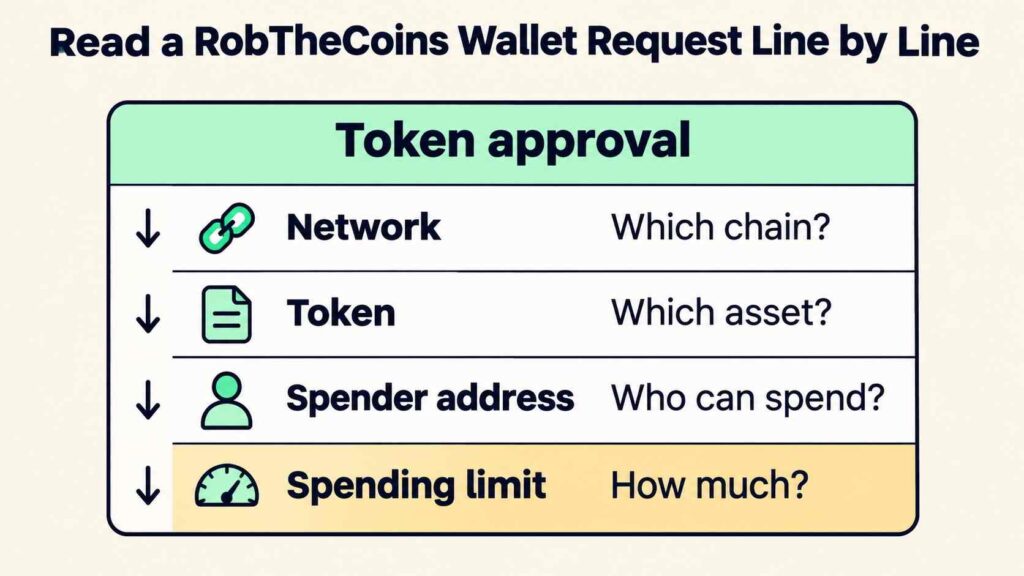
A wallet connection can reveal your public address and associated balances to an app. A token approval can authorize a spender to move a specified token up to an allowed amount. A page using RobTheCoins may describe either action as a simple connection. Read what your wallet actually asks you to confirm.
| What you see | What to check |
|---|---|
| RobTheCoins article link | Destination domain and the provider’s own documentation |
| RobTheCoins wallet connection request | App identity, selected account, and public information shared |
| RobTheCoins token approval request | Network, token, spender address, and spending limit |
| RobTheCoins payment request | Recipient, amount, network, and purpose |
Suppose a page carrying the RobTheCoins name says it needs to display your balance. Your wallet instead shows an unlimited token allowance. That approval would grant spending permission to the listed address. Close it and verify why the app requested that permission. If a page using RobTheCoins asks for your recovery phrase, close it immediately. Keep that phrase private.
Check a Signature Request Using RobTheCoins
A signature request can have different effects depending on what it says. Some messages let you sign in. Others can authorize token spending. If a RobTheCoins prompt asks you to sign unreadable text, stop. Ask the provider to explain the request through its official support channel. Keep the original RobTheCoins message and URL for reference.
Verify a Token Mentioned by RobTheCoins
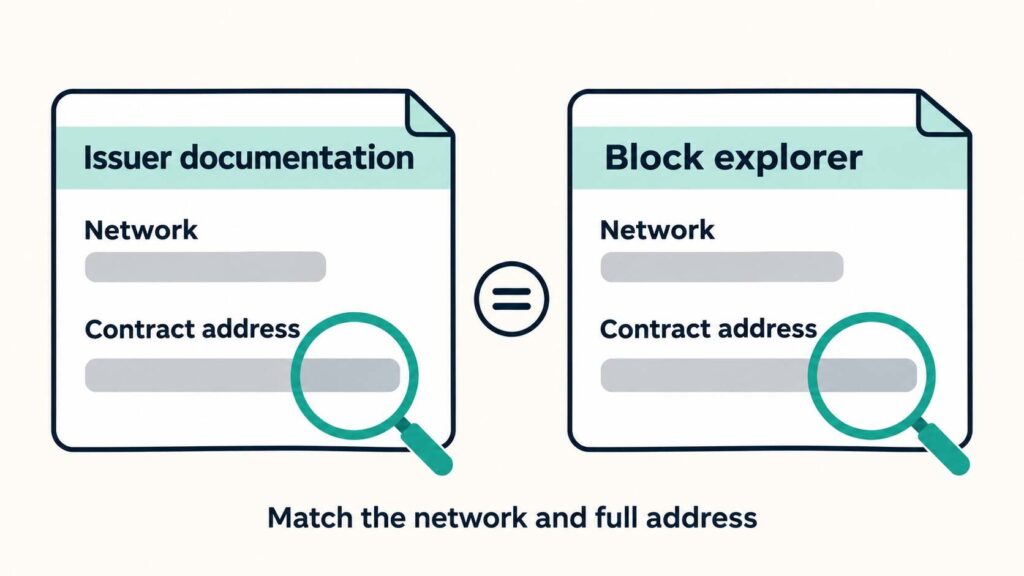
Start with the network and token contract address in the claimed issuer’s official documentation. A token name or ticker in a RobTheCoins post is too little information to identify the asset. Compare the full address on the correct network using a block explorer. The explorer shows activity tied to addresses. Establishing who controls an address requires separate evidence.
If a RobTheCoins article cites proof of reserves, open the underlying report. Check its date, the entity named, and which assets it covers. The SEC warns that such reports may omit liabilities. Use the operator’s terms to find who holds the keys and what rules apply to withdrawals.
If You Already Acted on a RobTheCoins Request
- Connected your wallet. Review the connected sites in your wallet and disconnect the app if you no longer need it. Check token approvals separately.
- Approved token spending. Follow your wallet provider’s official instructions to review and revoke unwanted allowances. An existing allowance can survive disconnecting the site.
- Sent crypto. Save the message, destination address, and transaction hash. Contact the exchange or payment provider you used promptly. Crypto transfers are usually difficult to reverse.
Questions to Ask Before You Trust a RobTheCoins Offer
Can a RobTheCoins article establish who runs an app?
Use the RobTheCoins article to identify the claim. Check the app’s publisher and operator in the service documentation. Confirm that the documentation points to the same domain you see in your wallet.
Does a RobTheCoins link prove that a service is affiliated?
The RobTheCoins terms cover links to third parties. Look for documentation from both parties if a relationship matters to your decision, and check any referral disclosure beside the link.
What if a RobTheCoins offer claims to be regulated?
Ask for the legal entity, jurisdiction, and specific activity. Check those details in the relevant regulator’s register. For U.S. investment advisers and brokers, Investor.gov explains where to search.
Your Next RobTheCoins Check
Before acting on a RobTheCoins prompt, name the app and say in plain language what it wants to do. If you can identify the RobTheCoins article but still cannot explain the permission, leave the request unsigned.
